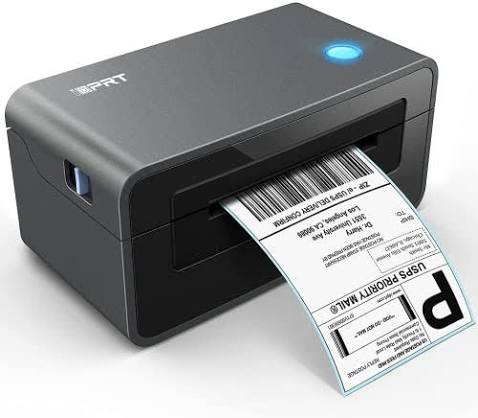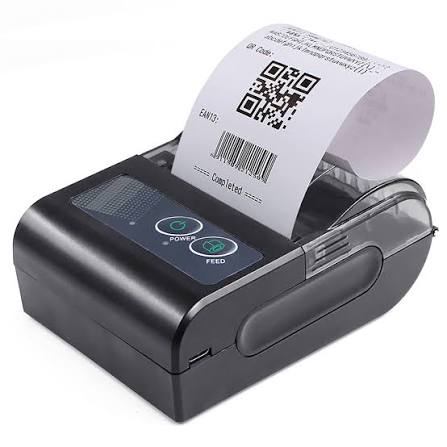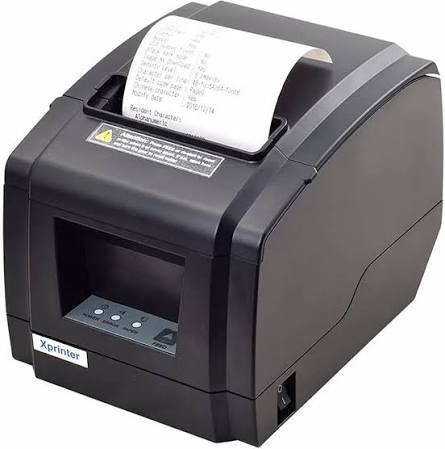
Retail businesses depend on efficient checkout systems to process customer purchases, maintain transaction records, and provide a convenient shopping experience. Whether operating a small convenience store, clothing shop, supermarket, or multi-location retail chain, having reliable receipt printing equipment is an important part of daily operations. The right printer can help employees complete transactions smoothly while reducing unnecessary delays and maintenance requirements.
However, retail businesses have different printing needs depending on their transaction volumes, checkout arrangements, and point-of-sale systems. Selecting an Xprinter Receipt Printer requires careful consideration of printing speed, resolution, connectivity, paper compatibility, and operating costs. Understanding these factors helps retailers choose equipment that supports their current requirements and future business growth.
1. Evaluate Your Retail Store’s Printing Requirements
Before comparing printer models, retailers should identify how frequently they need to print receipts and what information those receipts must contain.
A small clothing store may print relatively simple receipts throughout the day, while a supermarket may handle continuous transactions during peak hours.
Businesses should evaluate:
- Average daily transaction volume.
- Expected printing frequency during busy periods.
- Number of checkout counters.
- Typical receipt length.
- Requirements for logos, barcodes, and QR codes.
- Whether mobile or fixed printing is needed.
Understanding these requirements helps determine the appropriate printer capacity and prevents businesses from purchasing equipment that is either unnecessarily advanced or insufficient for their workload.
2. Choose a Suitable Printing Speed
Printing speed is an important consideration for retail checkout operations. Customers generally expect quick service, especially when several people are waiting in line.
Thermal receipt printer speed is commonly measured in millimeters per second (mm/s). A higher rated speed can help produce receipts more quickly, although actual performance also depends on receipt length, data processing, and print settings.
Retailers should consider their daily transaction volume when comparing printing speeds.
For example, a small shop with limited checkout activity may operate efficiently with a standard-speed model. A busy supermarket or department store may benefit from equipment designed for faster printing.
Choosing an appropriate speed helps maintain a smooth checkout process without paying for performance that the business does not need.
3. Consider Print Resolution and Receipt Readability
Receipts must display transaction information clearly so customers and employees can easily verify purchases.
Print resolution, measured in dots per inch (DPI), determines the level of detail a printer can reproduce.
Suitable resolution is particularly important when receipts contain:
- Small product descriptions.
- Business logos.
- Itemized prices and taxes.
- Barcodes and QR codes.
- Promotional graphics.
- Customer or transaction reference numbers.
Retailers printing basic text receipts may not require especially high resolution. However, stores using detailed graphics or machine-readable codes should evaluate this specification more carefully.
A clear sample print is a useful way to assess actual output quality before purchasing.
4. Select the Correct Paper Width
Paper width influences how much information can be displayed across a receipt.
Many thermal receipt printers support common paper sizes such as 58 mm and 80 mm, although supported formats vary by model.
58 mm paper is often suitable for compact receipts and smaller retail counters. It may be sufficient for shops that print basic transaction information.
80 mm paper provides more horizontal space and is commonly used when receipts contain longer product descriptions, detailed transaction information, or promotional content.
Retailers should check the printer’s supported paper width before purchasing. Using incompatible rolls can cause feeding problems and incorrect receipt formatting.
5. Check Paper Roll Capacity
Paper roll capacity determines how frequently employees need to replace thermal paper.
A printer that supports a larger roll diameter may require fewer replacements during busy operating periods, provided the roll fits within the printer’s specifications.
Retailers should review:
- Maximum supported roll diameter.
- Required core size.
- Paper width.
- Paper thickness.
- Ease of paper replacement.
For stores with high transaction volumes, selecting an appropriate roll capacity can reduce interruptions and help employees focus on customer service.
6. Compare Connectivity Options
Retail stores use different POS configurations, so the printer’s connectivity must match the available equipment.
Common connection options include:
| Connectivity option | Retail application |
|---|---|
| USB | Direct connection to a checkout computer or POS terminal |
| Ethernet | Network-based printing across retail workstations |
| Bluetooth | Wireless printing from compatible tablets and mobile devices |
| Wi-Fi | Connection through a local wireless network |
| Serial | Integration with certain older POS systems |
A small store with one checkout station may only need USB connectivity. Larger stores with multiple workstations may benefit from Ethernet or compatible wireless solutions.
Before purchasing, retailers should confirm that the printer supports the connection method required by their POS system.
7. Verify Compatibility With Retail POS Software
A receipt printer must communicate properly with the software used to process transactions.
Retail POS systems generate receipt information, including product names, prices, discounts, taxes, and payment details. The printer receives this information and converts it into a printed document.
Compatibility problems can prevent receipts from printing correctly or cause delays during installation.
Retailers should verify:
- Supported operating systems.
- Availability of appropriate printer drivers.
- Compatibility with the POS application.
- Supported printer command languages.
- Connection requirements.
- Availability of software development tools, if needed.
Testing the printer with the actual POS software before purchasing multiple units can help prevent integration problems.
8. Decide Between Desktop and Mobile Printers
Retail businesses should choose a printer design that matches their checkout arrangements.
Desktop Receipt Printers
Desktop models are commonly used at fixed checkout counters. They are suitable for supermarkets, convenience stores, clothing shops, and other retail environments with regular transaction activity.
These printers may offer higher printing speeds, larger paper capacity, and multiple connectivity options, depending on the model.
Mobile Receipt Printers
Mobile printers are useful for retailers that offer assisted checkout, operate temporary sales locations, or process transactions away from fixed counters.
They commonly feature compact dimensions, rechargeable batteries, and wireless connectivity.
The choice depends on whether the store requires stationary printing, mobile checkout, or a combination of both.
9. Evaluate Automatic Cutting Features
An automatic cutter separates printed receipts from the remaining paper roll after a transaction.
This feature can reduce manual work and make receipt handling more convenient for employees.
Automatic cutting is particularly useful in busy retail environments where staff members process transactions continuously.
Some printers use manual tearing edges instead, which may be sufficient for businesses with lower transaction volumes.
Retailers should compare cutter specifications, expected usage, and maintenance requirements before selecting a model.
10. Consider Barcode and QR Code Printing
Many retailers use barcodes and QR codes to connect printed receipts with inventory systems, loyalty programs, and digital services.
For example, a receipt may contain a QR code that directs customers to a feedback form or loyalty registration page. Transaction barcodes may also help staff retrieve purchase information.
If these functions are required, retailers should confirm that the printer and POS software support the intended code formats.
Print resolution, code dimensions, paper quality, and contrast all influence scanning reliability.
Testing sample codes with the store’s actual scanners or mobile devices is a practical way to confirm suitability.
11. Assess Durability for Daily Retail Use
Retail printers may operate for several hours each day, particularly in supermarkets and high-traffic stores.
The printer should therefore be suitable for the expected workload.
Important components to evaluate include:
- Thermal printhead.
- Paper feed mechanism.
- Automatic cutter, where included.
- Internal rollers.
- External housing.
- Power and connection interfaces.
Retailers should review manufacturer specifications for rated component life and recommended operating conditions.
A printer designed for regular commercial use may provide a more appropriate solution than a basic model intended for occasional printing.
12. Consider Space and Checkout Counter Layout
Checkout counters often contain several devices, including payment terminals, barcode scanners, cash drawers, computers, and customer displays.
A printer with suitable dimensions can help retailers maintain an organized workspace.
Before purchasing, measure the available installation area and consider whether employees can easily access the paper compartment and controls.
Compact desktop models may suit smaller stores, while larger checkout stations may accommodate printers with additional features.
Retailers should also plan cable placement and power access to prevent unnecessary clutter.
13. Compare Initial Purchase Price and Operating Costs
The purchase price is important, but it should not be the only factor influencing the decision.
Thermal receipt printers do not require ink cartridges or toner, which can simplify consumable management. However, businesses still need to purchase compatible thermal paper and maintain the equipment.
Long-term expenses may include:
- Thermal paper rolls.
- Replacement printheads.
- Cutter components.
- Power consumption.
- Repairs and servicing.
- Software or integration requirements.
- Equipment replacement.
Retailers should compare the total cost of ownership over the expected service period.
A lower-priced model may not offer the best value if it has limited durability, inadequate connectivity, or expensive maintenance requirements.
14. Review Maintenance and Cleaning Requirements
Regular maintenance helps preserve receipt quality and reduce equipment interruptions.
Paper dust and residue can accumulate around the printhead and rollers. Over time, this may contribute to faded printing, uneven output, or paper-feeding problems.
Retail employees should follow the manufacturer’s cleaning instructions and use appropriate materials.
Before purchasing, retailers should also check whether replacement components and technical documentation are readily available.
A printer that is easy to maintain can simplify equipment management across multiple checkout counters.
15. Check Warranty and Technical Support
Technical support becomes particularly important when receipt printers are essential to daily retail operations.
A printer malfunction can interrupt checkout activities and create inconvenience for both customers and employees.
Retailers should review warranty coverage, service availability, repair procedures, and access to replacement components.
Useful questions include:
- What is the warranty period?
- Which components are covered?
- Are replacement parts available?
- Is technical documentation provided?
- Can the supplier assist with installation?
- Are troubleshooting resources accessible?
Reliable after-sales support can help businesses address technical problems and manage equipment more effectively.
16. Plan for Future Retail Expansion
A printer that meets current requirements may become unsuitable as the business grows.
For example, a small store may later add checkout counters, introduce mobile payment systems, or open additional branches.
Retailers should consider whether their chosen equipment can support these developments.
Future requirements may include network connectivity, higher transaction volumes, mobile printing, and integration with updated POS software.
Selecting printers with suitable expansion capabilities can reduce the need for frequent equipment replacement.
17. Test the Printer Before Making a Final Purchase
Product specifications provide useful information, but testing helps retailers understand how a printer performs in real working conditions.
If possible, request a demonstration or sample unit before placing a large order.
A practical evaluation should include:
- Connecting the printer to the intended POS system.
- Printing typical retail transaction receipts.
- Checking text clarity and print darkness.
- Testing barcode and QR code readability.
- Evaluating printing speed during repeated transactions.
- Confirming paper-loading and cutting performance.
- Testing wireless connectivity where applicable.
- Reviewing basic maintenance procedures.
This process helps identify compatibility issues and confirms whether the printer meets the store’s operational requirements.
Conclusion
Choosing the right Xprinter receipt printer for retail operations requires a careful assessment of business needs and technical specifications. Printing speed, resolution, paper compatibility, connectivity, POS integration, durability, and operating costs all influence the suitability of a particular model.
Small retail stores may prioritize compact designs and straightforward connectivity, while supermarkets and larger businesses may require faster printing, greater paper capacity, and network support.
By evaluating transaction volume, testing equipment, and considering future expansion, retailers can select a receipt printing solution that supports efficient checkout operations and reliable customer service.